콘텐츠·채널 관리
★4.4· 후기 148개
A practical Smart Place Review Management tool that helps you segment customers by purchase value.
즉시 다운로드
결제 확인 후 설치 파일(Windows·macOS) 자동 제공
라이선스 자동 발급
마이페이지에서 라이선스 키 확인
원격 설치 지원
초기 세팅이 어려우면 원격으로 지원
안전한 로컬 처리
외부 수집·자동 발송 없이 내 PC에서 동작

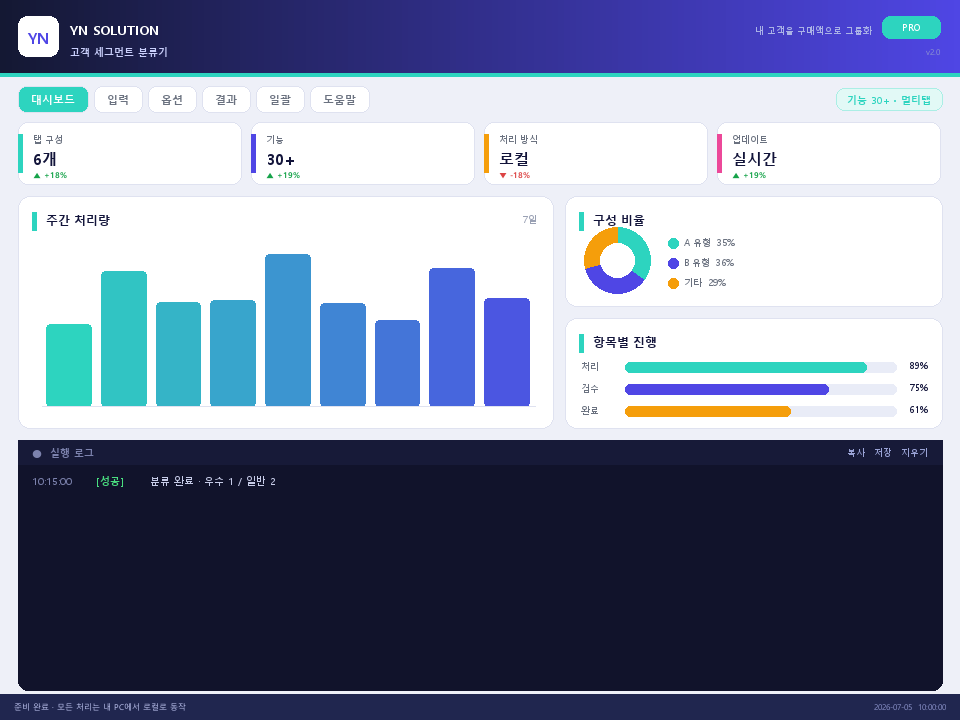
구매 후 실행하면 아래 화면의 프로그램(YN 고객 세그먼트 분류기)이 열립니다.

모든 작업은 내 PC 안에서만 이뤄져요. 외부로 자료를 보내거나 자동으로 글을 올리는 기능은 없는 안전한 프로그램입니다.
콘텐츠·채널 관리 · 처음이신 분은 왼쪽만 보셔도 됩니다.
No installation needed
Just double-click the downloaded file to run it and start using it.
Works even without the internet
All work is processed inside my computer, so materials do not leave it.
Results are saved as files
Save organized results as files in the folder you want so they are easy to find again.
If you get stuck, we help remotely
If the initial setup is difficult, we proceed together through screen sharing.
Recommended specifications
General office PC · 4GB or more memory · 100MB free storage
* Actual screens and features can be checked in the demo video and preview. If you need detailed specifications, we will provide guidance through a pre-purchase inquiry.
A practical Smart Place Review Management tool that helps you segment customers by purchase value. Smart Place Review Management Customer Segment Classifier — 매일 손으로 하던 작업을 대신 처리해, 아낀 시간을 더 중요한 일에 쓰도록 도와드리는 프로그램입니다.
If even one applies to you, please read to the end.
Time being lost
Thirty minutes a day becomes 10 hours a month; in a year, several full days disappear. That time does not come back.
Accumulating mistakes
When people repeat tasks, mistakes eventually happen. Reversing incorrect materials takes even more time and cost.
The real work that gets postponed
While you are stuck doing simple tasks, the work that actually creates sales and growth keeps getting pushed back.
The inconvenience you dealt with was not your fault.
Excel functions and macros
You need to know how to build it yourself, and even small changes in the situation require rework.
Free tools here and there
Moving from one site to another often ends up taking more time.
In the end, by hand
It may seem the most accurate method, but the more it is repeated, the more tiring and slower it becomes.
The method was just cumbersome. Now there is an easier way.
Just run it without installation and use it right away, and all processing is done inside my PC, so it is safe. Follow the screen as shown, and even first-time users can get used to it in minutes.

내 고객 목록을 '이름,구매액' 형식으로 붙여넣습니다.
A few clicks are enough without complicated settings, so you can use it right away even if you are not familiar with it.
우수 고객 기준 금액을 정합니다.
The program handles labor-intensive tasks for you and saves time.
[분류하기]를 누르면 우수/일반 그룹으로 나뉘고 저장할 수 있습니다.
Results are neatly organized into tables and charts, so you can understand at a glance what to do and how.
Classify customers by clear rules so it is easier to manage.
A practical workflow for organizing customers consistently and using the results right away.
Save the organized customers as files for later use.
Easy for everyone
Run once without installation. Even if you are not comfortable with computers, you can follow the screen as shown.
Safely on my PC
All processing stays inside my computer. Since no data is sent outside, you can use it with peace of mind.
With you to the end
If you get stuck, we help remotely. The purchase is not the end; we stay with you until you can use it well.
Proof
148 reviews
Real customer reviews
4.4★
Average satisfaction
100% local
Processed on my PC without external transmission
BEFORE
Manual repetition · wasted time · inconsistent results
AFTER
A few clicks · time savings · consistent results
| Existing method | YN 고객 세그먼트 분류기 | |
|---|---|---|
| Repetitive work | Manual work every time ✕ | A few clicks ✓ |
| Result quality | Inconsistent ✕ | Consistent results ✓ |
| Time required | Takes a long time ✕ | Major savings ✓ |
| Installation and support | Complex ✕ | Run without installation · remote support ✓ |
Recommended for these users
We do not recommend it in these cases
This program is a lawful tool intended for the user's own data and channels.
When the time you save every day adds up, the way you work changes. Start now.
01
Purchase and deposit
Deposit to the guided account
02
Download
Receive instantly in My Page
03
Apply immediately
Use immediately after running
01
설치
Windows 설치파일을 실행합니다. 미서명 배포본이라 SmartScreen이 뜨면 '추가 정보 → 실행'을 누르세요.
02
라이선스 활성화
마이페이지에서 발급된 라이선스 키(YNM-로 시작)를 복사해 프로그램 라이선스 창에 붙여넣고 활성화합니다.
03
내 채널 로그인
프로그램 안의 브라우저로 내 블로그·카페·SNS·영상 채널에 직접 로그인합니다. 저장된 내 세션만 사용합니다.
04
발행 채널·방식 설정
워드프레스·블로그스팟은 API로, 티스토리·네이버블로그·카페는 브라우저로 발행합니다. API만/브라우저만/둘 다, 계정 순환·발행 간격·1회 작업량·예약 시작 시간을 설정합니다.
05
주제 입력 → AI 자동 생성
주제·키워드만 넣으면 AI가 SEO 장문 콘텐츠와 대표 이미지를 자동 생성합니다.
06
제휴 링크 자동 배치
상단·중간·하단 링크 후보를 등록하면 콘텐츠에 자동으로 삽입됩니다.
07
안전 점검 미리보기
기본은 안전 점검 모드입니다. 실제 발행 없이 결과를 먼저 확인합니다.
08
자동 발행 시작(무인 자동화)
실제 발행을 승인하고 '전체 자동 시작'을 누르면 준비된 채널에 순서대로 24시간 무인으로 글이 자동 발행됩니다. 플랫폼별로 하나씩 실행할 수도 있습니다.
09
상위 노출 최적화(선택)
네이버 플레이스·쇼핑/스마트스토어·오늘의집·쿠팡 리스팅과 SEO 콘텐츠·리뷰 요청을 최적화합니다. 트래픽·리뷰 조작이 아닌 정당한 방식입니다.
자동 발행(무인 자동화)
한 번 설정해두면 내가 로그인해 둔 내 채널들에 AI가 만든 글과 이미지가 순서대로 자동으로 올라갑니다. 사람이 매번 붙어 있지 않아도 24시간 돌아갑니다.
실제 발행에는 각 플랫폼의 내 계정 로그인이 필요하며, 새 버전이 나오면 프로그램이 실행 시 자동으로 업데이트를 확인합니다.
영상은 실제 프로그램 화면 기준이며, 업데이트에 따라 일부 화면이 다를 수 있습니다.
Smart Place Review Management Customer Segment Classifier Installer (Windows / macOS)
Download immediately after purchase
정식 라이선스 키
Check in My Page
단계별 사용 가이드
Easy to follow even for first-time users
원격 설치 지원
Screen-sharing support if installation is difficult
Handle customers manually.
Yes. You can adjust the result and use it in your own workflow.
A practical workflow for organizing copy consistently and using the results right away.
There is no separate installation process. Just run the downloaded file and use it right away; if you still get stuck, we help remotely.
We made it so you can follow the screen exactly as shown. A step-by-step user guide is included, so it is okay even if it is your first time.
Immediately after confirmation, the installation file and license are automatically issued in My Page. No waiting is needed.
All processing is done only inside my PC. It does not send or collect materials externally, so you can use it with confidence.
Start with confidence
설치가 안 되거나 실행이 안 되면 원격으로 끝까지 함께 해결합니다. 정상적으로 사용할 수 없는 경우에는 환불·라이선스 안내에 따라 성실히 처리해 드립니다. Refund and License Guide
₽2,566
When you purchase, the license and download are issued automatically, and we also support remote installation.
결제·다운로드가 처음이시면 이용 방법 안내를 참고하세요. the how-to-use guide
4.4
후기 148개
처음엔 조금 헤맸는데 익숙해지니 괜찮아요. 가격 생각하면 괜찮은 편.
간단하고 직관적이라 좋아요. 가격 대비 만족도 최고입니다.
1인 사업자라 괜찮아요. 잘 쓰고 있습니다.
1인 사업자라 정말 편해요. 강력 추천합니다.!!
설치가 살짝 헷갈렸지만 결과는 좋네요. 무난하게 잘 쓰고 있어요.
주변에도 추천했어요. ㅎㅎ
실용적이에요.
카페 운영하면서 실무에 바로 도움돼요. ^^
부업으로 쓰는데 이 가격에 이 정도면 대만족.
친절하게 안내해주셔서 잘 설치했어요.
콘텐츠·채널 관리
A practical Used-Goods Marketplace tool that helps you create customer message templates with merge fields.
₽3,224
콘텐츠·채널 관리
내 블로그·카페·SNS·영상 채널에 AI가 24시간 자동으로 콘텐츠를 만들고 발행하는 올인원 마케팅 자동화 프로그램입니다.
₽98,684
콘텐츠·채널 관리
A practical Knowledge tool that helps you plan content and manage publishing schedules.
₽3,224
콘텐츠·채널 관리
A practical Band tool that helps you plan content and manage publishing schedules.
₽2,566
광고
필요하실 만한 서비스를 골라 모았어요. 눌러서 바로 이동하실 수 있습니다.
iHerb
비타민·건강기능식품 해외 직구
바로가기 →Shopify
직접 만드는 온라인 쇼핑몰 플랫폼
바로가기 →탑툰
웹툰 감상 쿠폰
바로가기 →지그재그
여성 패션 쇼핑 앱
바로가기 →GoldMining
리워드 적립 앱
바로가기 →ExpressVPN
빠른 글로벌 VPN 서비스
바로가기 →GoingBus
해외 직구·공동구매
바로가기 →Trip.com
호텔·항공권 예약
바로가기 →RealT
부동산 조각 투자 플랫폼
바로가기 →Hotels.com
전 세계 호텔 예약
바로가기 →AliExpress
해외 직구 종합 쇼핑
바로가기 →쿠팡
국내 최대 온라인 쇼핑
바로가기 →Temu
초저가 해외 직구
바로가기 →NordVPN
보안·프라이버시 VPN
바로가기 →Agoda
호텔·숙소 예약
바로가기 →TikTok Lite
틱톡 라이트 초대
바로가기 →TikTok Lite
틱톡 라이트 초대
바로가기 →TikTok Lite
틱톡 라이트 초대
바로가기 →TikTok Lite
틱톡 라이트 초대
바로가기 →본 영역에는 제휴(어필리에이트) 링크가 포함되어 있으며, 쿠팡 파트너스 등 일부 파트너스 활동을 통해 일정액의 수수료를 제공받을 수 있습니다. 이는 이용자의 구매 가격에 영향을 주지 않습니다.